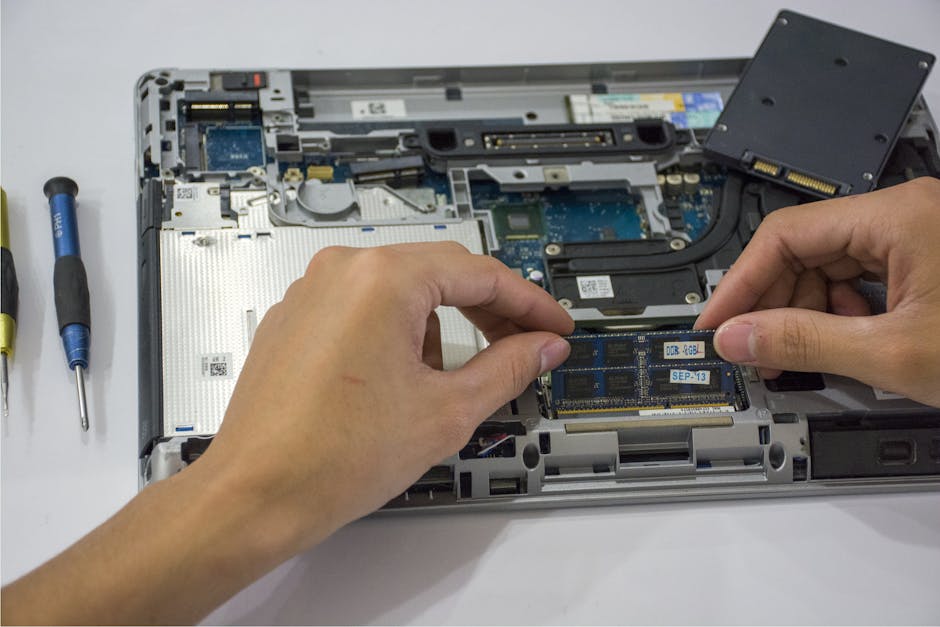
People often search for "how to recycle electronics" when seeking ways to dispose of outdated devices, indicating a growing interest in sustainable practices since 2015. According to the United Nations' Global electronic waste) Monitor, over 53 million metric tons of e-waste were generated globally in 2019, highlighting the urgency for effective recycling and repair solutions. This guide on "Repair vs Replace: When Is It Worth Fixing Your Device?" aims to help readers decide whether it's more beneficial to fix their broken gadgets or replace them with new ones, considering both environmental impact and cost-effectiveness.
rs often cost around 30% to 50% less than replacing it.
- Sustainability: Recycling old devices has become increasingly important. In 2019, only about 17.4% of electronic waste was recycled globally.[^1] By repairing your device, you're contributing to a more sustainable future.
- Familiarity and Convenience: You already know how your current device works, so there's no learning curve involved in getting back to business as usual.
#### Cons
- Availability of Parts: Some older devices can be harder to repair due to discontinued parts. This could make the process lengthy and costly.
- Time Investment: Repairs often take longer than replacements, which might not be ideal if you need your device immediately for work or personal reasons.
Replacing Your Device
#### Pros
- Latest Technology: Newer devices come with updated features and improved performance that can enhance your experience. For example, new smartphones offer better camera quality, faster processors, and more storage.
- Warranty: Buying a brand-new device often comes with a warranty that covers defects or malfunctions for at least one year.
- Convenience: Getting a replacement is quicker since you won't have to wait for parts or repairs.
#### Cons
- Higher Costs: New devices are expensive. For instance, the average price of an iPhone 13 in Australia was around $899.[^2]
- Environmental Impact: Manufacturing new electronics consumes significant resources and energy, contributing to environmental degradation.
Factors to Consider
When deciding whether to repair or replace your device, consider a few key factors:
#### Age of Your Device If the device is less than two years old, it's likely worth fixing. Devices that are older might not be worth repairing if parts aren't available and costs outweigh benefits.
#### Severity of the Problem Is the issue minor, like a cracked screen or battery replacement? These are often quick fixes. If it's something major like water damage affecting internal components, replacement might be more practical.
#### Value of Your Device Check how much your current device is worth on platforms like Decluttr (UK), Gazelle (US), and SellMyMobile (Australia). This can give you a sense of whether buying new or repairing makes financial sense.
Common Mistakes to Avoid
- Waiting Too Long: If the issue isn't fixed, it might worsen over time. Don't procrastinate.
- Ignoring Warranty Coverage: Check if your device is still under warranty before paying out-of-pocket for repairs.
- Choosing Unreliable Services: Use reputable repair services like those offered by Best Buy (US), Currys PC World (UK/EU), and Apple Store (global).
Practical Tips
- Check Online Forums: Websites like iFixit provide detailed guides on how to fix specific issues with your device.
- Use Recycling Programs: Companies like Staples, Best Buy, and Apple offer recycling programs where you can trade in old devices for credit towards a new one.
- Consider Refurbished Options: Instead of buying brand-new, consider refurbished models from reputable sellers.
According to the US EPA, recycling one million laptops saves the energy equivalent of electricity used by 3,657 us homes in a year.
Step-by-Step Guide
- Identify the issue with your device.
- Research repair costs online or through local service providers.
- Look up your device's value on trade-in websites.
- Weigh the pros and cons based on age, warranty status, and severity of the problem.
- Decide whether to repair or replace.
Summary
- Repairing is cost-effective and sustainable but might take longer and rely on part availability. At Repair vs Replace: When Is It Worth Fixing Your Device?, - Replacing offers convenience with the latest technology but comes at a higher price tag and environmental cost.
- Consider your device's age, warranty status, and severity of issues before making a decision.
By following these guidelines, you can make an informed choice about whether to repair or replace your device. Remember, every situation is unique-what works for one person might not work for another. But with the right information and resources, you'll be able to find the best solution for your needs.
[^1]: Global E-Waste Monitor 2020, United Nations University [^2]: GfK Market Research Data (2021)
Sources
- US EPA
- UN Global E-Waste Monitor 2024
- Consumer Technology Association
Repair vs Replace: When Is It Worth Fixing Your Device?: framework + alternatives + FAQs (2026-05-20)
Practical 5-step process
- Confirm device condition + age. Working post-2018 device → trade-in route. Older or broken → recycling route. Compare via Trade-In Best Price Finder before committing to recycling.
- Sanitise the device. Sign out of cloud services (iCloud, Google, Microsoft, Samsung). Factory reset via Settings menu. For sensitive data: certified ITAD provider with NIST 800-88 guidelines sanitisation - see Hard Drive Destruction Cost Calculator.
- Find a compliant disposal route. Manufacturer take-back (free for like-for-like purchases under EU WEEE / UK WEEE / select US state laws), retailer drop-off (free at most major retailers), or certified local recycler. Use our Recycling Locator for nearby options.
- Document the disposal. Get a Certificate of Destruction for any data-bearing device (free template via our GDPR Data Erasure Certificate Generator). Keep for 3-7 years depending on data classification.
- Verify the downstream certification chain. Reputable recyclers partner with R2v3 / e-Stewards certification / ISO 14001 certified processors. Ask which standard the downstream processor holds before drop-off.
Why this matters legally
Skipping compliant disposal has measurable penalty exposure:
- EU WEEE Directive 2012/19/EU + UK WEEE Regulations 2013: producer + waste-generator liability. Penalties typically £5,000-£50,000 per incident under environmental enforcement.
- US state e-waste laws: 25 states have mandatory laws as of 2026. Penalties range $1,500-$25,000 per incident (California Universal Waste Rule, New York Electronic Equipment Recycling and Reuse Act).
- EPA RCRA 40 CFR Part 273: federal Universal Waste Rule covers e-waste. Up to $76,764 per day per violation as of 2026.
- UK GDPR + EU GDPR Art 32: personal data on disposed devices triggers liability if not properly sanitised. Penalties up to £17.5M or 4% global turnover.
Check your specific risk via E-Waste Fines Checker.
Three common consumer mistakes
- Putting electronics in general waste. Most jurisdictions explicitly ban this; municipal collection rejects loads at the kerb.
- Trusting "free pickup" without verifying certification. Some scrap collectors export to non-OECD countries (violates e-Stewards + Basel Convention). Always ask for R2v3 or e-Stewards certificate before handing over devices.
- Wiping data via factory reset only on SSDs. Factory reset on SSD does NOT cryptographically erase - drive may still have recoverable data. Use NIST 800-88 Purge for SSDs.
Frequently asked questions
Is electronics recycling always free? For consumer drop-off and mail-in: yes, free at point of use under producer-pays framework. Exceptions: bulk appliance pickup ($25-$50), CRT TVs/monitors ($19-$50), oversized batteries.
Will the recycler resell my data? Reputable recyclers either (a) wipe to NIST 800-88 standard before any onward sale, or (b) physically destroy data-bearing media before reuse path. Ask which method applies before drop-off.
What happens if my device still has value? Don't recycle - trade in first. Even a 5-year-old smartphone often fetches £25-£80 trade-in vs $0 recycling. Compare via Trade-In Best Price Finder.
Related guides + tools
---
Framework verified against EU WEEE Directive 2012/19/EU + UK WEEE Regulations 2013 + EPA RCRA 40 CFR Part 273 + US state e-waste laws + NIST SP 800-88 Rev 1 as of 2026-05-20. Operated by Defining Style Limited (UK Companies House 10572391, ICO Registration ZA711914). Rules update annually - verify current penalties on enforcement-authority sites before relying on figures.
Frequently Asked Questions
Is repair vs replace: when is it worth fixing your device actually recyclable?
Yes, in most jurisdictions. Whether repair vs replace: when is it worth fixing your device can be recycled depends on the material composition and local collection programmes. Most electronics + appliances are recyclable via manufacturer take-back, retailer drop-off, or certified local recycler. Find compliant routes via our [Recycling Locator](/tools/recycling-locator).
Is recycling repair vs replace: when is it worth fixing your device free?
For most consumer items dropped off at retailers (Best Buy, Currys, Apple, Samsung, Walmart) or via manufacturer mail-in programmes: yes, free at point of use. Funded by Producer Compliance Scheme contributions under EU WEEE + UK WEEE + voluntary US programmes. Exceptions: bulk appliances ($25-$50 pickup), CRT TVs/monitors ($19-$50), oversized batteries.
What happens if I just throw it in the regular bin?
In most jurisdictions, electronics in general waste is illegal. Penalties typically: £5,000-£50,000 (UK) or $1,500-$25,000 (US state-level) per incident. Curbside refuse collection rejects flagged loads, returning them to the household. Check your jurisdiction's specific rules + penalty exposure via our [E-Waste Fines Checker](/tools/e-waste-fines-checker).
Should I wipe data before recycling?
Yes, for any data-bearing device. (1) Sign out of all cloud services. (2) Factory reset via Settings menu. (3) For sensitive data, use a certified ITAD provider with NIST 800-88 sanitisation. Free Certificate of Destruction template: our [GDPR Data Erasure Certificate Generator](/tools/gdpr-erasure-certificate-generator).
Could I get money for it instead of recycling?
Working devices typically retain meaningful trade-in value for 3-5 years. A 5-year-old smartphone often fetches £25-£80 trade-in vs $0 from recycling. Compare 7 buyback prices in 30 seconds via our [Trade-In Best Price Finder](/tools/trade-in-best-price-finder) before committing to recycling.